
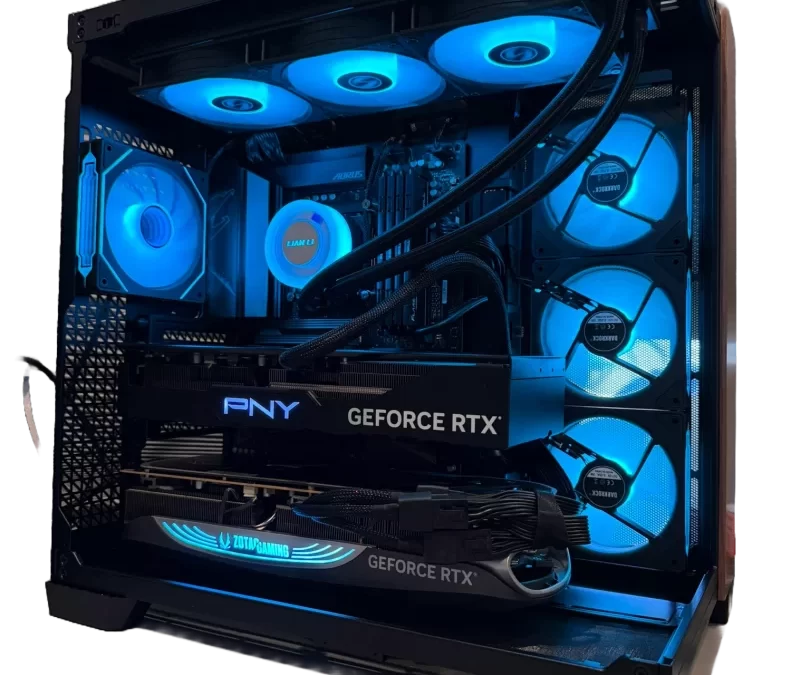
When it comes to building high-performance AI and compute workstations, raw power is only half the equation. The real challenge—and the true mark of engineering expertise—is how effectively that power can be sustained under heavy workloads without thermal throttling, instability, or long-term degradation.
At Custom Lux PCs, we’ve taken a fundamentally different approach to designing dual GPU systems, especially those powered by the cutting-edge NVIDIA RTX 5090. Instead of treating cooling as an afterthought, we engineer every system from the ground up with thermal optimization as a core principle. The result: dual 5090 workstation cooling that consistently deliver peak performance while maintaining safe, stable temperatures—even under full load.
Proven Stability Since Day One
Since the release of the RTX 5090 in early 2026, Custom Lux has been building and deploying dual-GPU tower workstations across a range of industries—from AI development labs to production studios. Notably, these systems have operated without a single reported thermal failure.
That’s not luck—it’s design.
We’ve refined a multi-layered strategy that combines hardware selection, airflow engineering, and software-level optimization to ensure thermal stability in even the most demanding environments.
Strategic PCIe Spacing: The Foundation of Airflow
One of the most overlooked aspects of dual GPU builds is motherboard layout—specifically, PCIe slot spacing.
In many off-the-shelf systems, GPUs are installed too close together, starving the top card of fresh air. At Custom Lux, we deliberately select motherboards that provide optimal spacing between the top and bottom GPUs. This ensures that the top card—typically the one most prone to overheating—has direct access to incoming cool air from the case intake fans.
It’s a simple concept, but one that dramatically impacts real-world thermals.
Intelligent GPU Pairing for Maximum Efficiency
Not all GPUs cool the same way, even within the same model family. That’s why we carefully select and pair GPU variants to maximize airflow efficiency.
Our preferred configuration places a NVIDIA RTX 5090 Founders Edition in the top slot, paired with a larger, triple-slot card from brands like MSI, ASUS, Gigabyte, or ZOTAC in the bottom slot.
Why this combination?
- The Founders Edition card has a more compact design, allowing greater clearance for airflow in the top position.
- The larger bottom GPU features a more robust heatsink, enabling it to dissipate heat more effectively before exhausting air upward.
- This creates a thermal gradient where the top GPU receives cooler intake air, rather than being choked by the heat output of the bottom card.
The result is a balanced thermal ecosystem inside the case—something most system integrators simply don’t account for.
Case Engineering: Airflow at Scale
Even the best GPU configuration will struggle in a poorly ventilated chassis. That’s why case selection is critical.
We’ve tested a wide range of enclosures, including the Fractal Design Define 7 XL, which performs well in dual GPU setups. However, our top recommendation is the Antec C8.
The Antec C8 stands out due to its aggressive intake design, particularly its lower intake fan configuration. This allows cool air to be pushed directly toward the GPUs, improving thermal consistency across both cards.
For users who require additional storage but don’t want to compromise airflow, we also offer creative solutions such as external SATA drive arrays. These setups house drives outside the main chassis while maintaining direct SATA connections to the motherboard—delivering faster speeds than USB-based solutions without adding thermal load inside the case.
Custom Fan Curves: Where We Truly Stand Apart
Hardware is only part of the equation. What truly sets Custom Lux apart is our software-level optimization—specifically, our custom fan curve tuning.
Out of the box, many GPUs—especially the Founders Edition 5090—ship with conservative fan profiles designed to minimize noise. While quiet, these default settings often allow temperatures to climb into the 80–85°C range under load.
We don’t accept that.
Instead, we meticulously tune fan curves on both Windows and Linux (including Ubuntu systems) to strike the perfect balance between cooling performance and acoustics. By slightly increasing fan aggressiveness—without pushing anywhere near maximum speeds—we consistently reduce load temperatures into the 65–75°C range.
This isn’t guesswork. Each system is individually tested and calibrated to ensure optimal thermal behavior under sustained workloads.
Dual RTX 5090 Workstation Cooling: The Ultimate Thermal Solution
For users who demand the absolute lowest temperatures, we offer optional liquid cooling solutions using AIO (all-in-one) GPU designs.
At approximately $700 per GPU, these systems provide a dramatic reduction in operating temperatures. In recent builds, we’ve observed dual 5090 configurations maintaining temperatures at or below 55°C under full load—an exceptional result for such high-performance hardware.
Even better, these AIO systems require no ongoing maintenance, making them ideal for professional environments where reliability is paramount.
While air cooling is more than sufficient for most users, liquid cooling offers an extra layer of thermal headroom for extreme workloads or heat-sensitive environments.
Power Limiting for Longevity and Efficiency
Performance isn’t just about peak output—it’s also about sustainability over time.
One of the unique strategies we implement at Custom Lux is power limiting the RTX 5090 GPUs to approximately 550 watts. While these cards are capable of drawing more power, running them at slightly reduced limits offers several key benefits:
- Lower operating temperatures, reducing thermal stress on components
- Improved efficiency, delivering near-identical performance at lower power draw
- Extended GPU lifespan, minimizing long-term wear and degradation
In real-world workloads, the performance difference between unrestricted and power-limited configurations is often negligible—yet the gains in thermal stability and hardware longevity are substantial.
This is a perfect example of our philosophy: optimize for sustained performance, not just peak benchmarks.
Beyond Towers: Open-Air GPU Servers
For clients who require even greater scalability, we also offer open-air GPU server configurations inspired by mining rig designs.
These systems can support up to seven GPUs in platforms like Threadripper Pro workstations, offering unmatched expandability and airflow. With open chassis designs, heat buildup is minimized, and cooling efficiency is maximized.
Of course, this approach comes with trade-offs—larger physical footprint, visible cabling, and the need for external drive mounting solutions—but for the right use case, it’s an incredibly powerful option.
A Hands-On Approach to Performance
What truly differentiates Custom Lux isn’t just the hardware—it’s the level of support and expertise we provide.
We don’t just deliver a workstation and walk away. We work directly with clients to test, configure, and optimize their systems. Whether it’s training researchers in a lab environment or fine-tuning performance for a specific AI workload, we ensure that every system operates at its full potential.
The Bottom Line
Dual GPU workstations—especially those built around the RTX 5090—are incredibly powerful tools. But without proper thermal management, that power can quickly become a liability.
At Custom Lux, we’ve developed a holistic approach that combines intelligent hardware selection, advanced airflow design, custom software tuning, and power optimization to deliver systems that are not only fast, but stable, efficient, and built to last.
In a market where most vendors focus on specs alone, we focus on what truly matters: real-world performance you can rely on.
Request a Build Today!
See Our Reviews
Call us Now!